
Scriptable Object Character Controller
A codeless reprogrammable character controller
This tool adds a layer of abstraction between the game loop and the character controller logic. Allowing for more dynamic character controllers than simple value swaps.
Its made up of 3 Modules:
- Components: The MonoBehaviors, (you can’t really escape these for a character controller)
- Behaviors: Inherits from ScriptableObjects. Logic that is called during Update/FixedUpdate to update the character controller
- Actions: 1 time action callbacks
Components
Even when all the logic is contained in a ScriptableObject, something has to call it within the game loop. Hence the use of Monobehavior. The components in this tool are relatively simple compared to others. All they will do is tell their Behavior to do the polymorphic DoBehavior()
//Example
public class MovementControllerComponent : Monobehavior
{
	[SerializeField] MovementBehavior movementBehavior;

	void Update()
	{
		movementBehavior.DoBehavior(behaviorParams);
	}
}
The behavior can be set via script, or inspector. This allows the same component to have multiple behaviours.
Behaviors
In most character controllers you are be able to change the speed, jump force, aim sensitivity, etc. However, modifying those values does not change the way those values are applied.
Behaviors were my solution to letting me change the controller logic on the same character controller in addition to changing the values.
For example:
VelocityMovementbehavior: sets velocity to based on $input * speed$.
TeleportMovementbehavior: sets position based on $input * distance$Both the behaviors above inherit from
MovementBehavior, so theMovementControllerComponentcould use either of them, and even change the one its using at runtime.
The tool contains behaviors for the following:
- movement: velocity, teleport in direction, teleport to position.
- aiming: pointer position, in direction, to a transform
Actions
Unlike behaviors which are meant to be called from Update, actions are meant to be called from a button callback, they can be called from different parts of a button press, have cooldowns, delays, trigger effects using my [SOEffects] tool, and more.
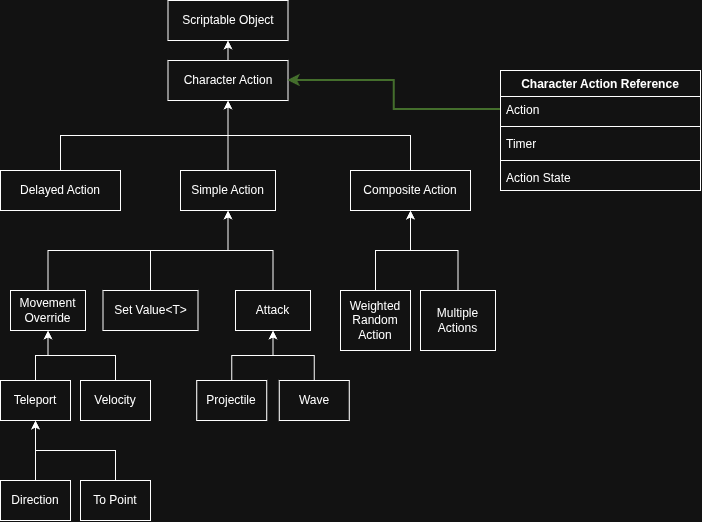
Actions are where the majority of this tools versatility lie. Especially the attacks.
One of the early issues I ran into with actions especially attacks, was that it was getting annoying to test values.I was instantiating the CharacterActions so I couldn’t even change the values at runtime. this meant stopping, setting the value and replaying to change 1 value.
I ended up with 2 solutions to this, both of which are still used.
- Not instantiating the SOs. The reason I was doing it was so that each action’s timer was self contained, not a bad idea, but instantiating SOs makes them impossible to set in the inspector, and instantating such big data classes was probably not the best practice. I ended up moving the timer to the CharacterController.
- The more useful change was creating an extensive gizmo drawing system for the attacks that allowed me to see the attack without even having to enter playmode. The gizmos use almost the exact same logic as runtime which means changing a function or value will update the gizmos accordingly with almost perfect parity.
- Gizmos in particluar led to some incredibly fast testing, fixing, and iterating of attacks, and some “Modern Art”