
Shared Values
An inspector based dependency injection event system
The Problem
On of my biggest issues with unity games is when scripts, usually MonoBehavior, reference other scripts, with SerializeField, GetComponent, Static Events or Singletons to get or set values within them. This ends up coupling code making it more likely to break during system changes, and makes it harder to test individual features without testing the entire game.
A Solution
To combat this and assist in development I made a dependency injection framework/event system inspired by 2 talks given at Unite
- Unite Austin 2017 - Game Architecture with Scriptable Objects
- Unite 2016 - Overthrowing the MonoBehaviour Tyranny in a Glorious Scriptable Object Revolution
The key design principles that I wanted to incorporate from these talks were:
- Component Oriented Design
- Modular
- Debuggable
- Expandable
Overview
Shared Values adds an abstraction layer to handle values in between namespaces and classes allowing them to only care about the values, not where they come from.
Shared Values makes heavy use of the Unity Inspector, The Listener Pattern, Object Oriented Programming, Generic Classes, and Polymorphism
The core of the tool is SharedValueReference which is essentially a pointer class. It tells the component referencing it, the ammount its value should be shared:
- A normal variable
- A super global
SharedValue(Scene independent, synced across objects) - An instanced
SharedValue(synced across all other references that use the same instancer)
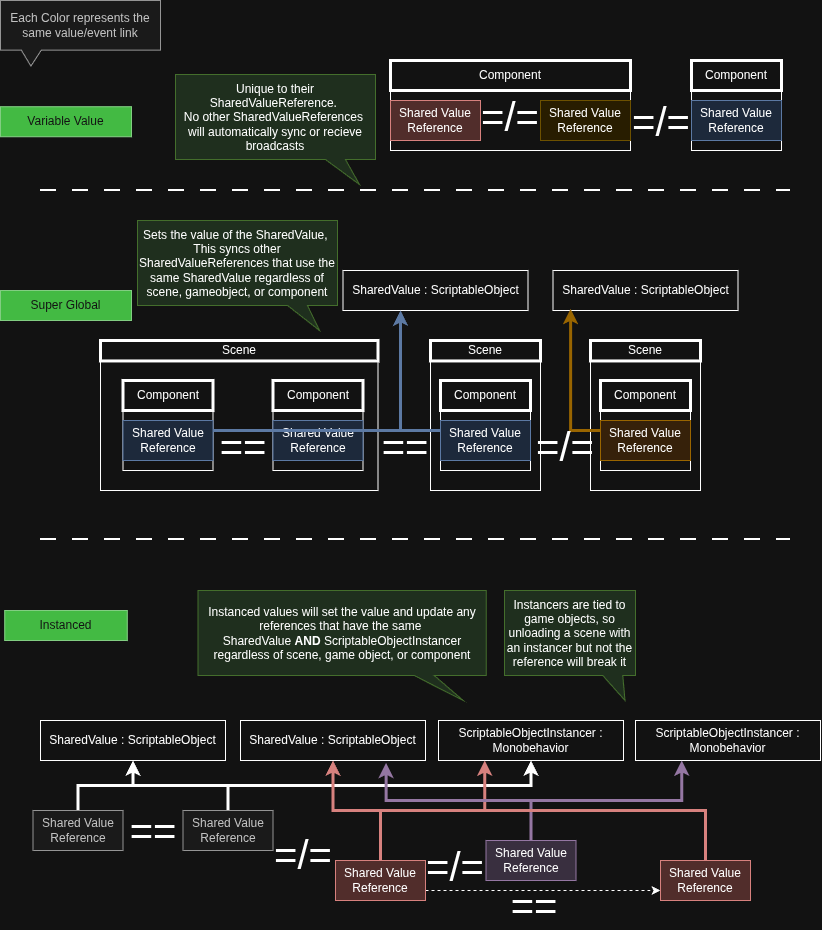
The value can be set via a script, and for a SharedValue, via a UnityEvent:
Value = newValue- Sets
Valueand broadcasts thenewValue
- Sets
SetValueWithoutNotify(newValue)- Sets the
Value, does not broadcast
- Sets the
SetValueWithBroadcastIfChange(newValue)- Sets
Valueand broadcasts ifnewNalueis different fromValue
- Sets
Listening can be done by using one of the provided components or in a script with AddListener(Funciton)
Unlike an event callback which will just broadcast a value, a SharedValueReference stores the value so it can be read, like in Update()
There are currently 5 modules to Shared Values, the following 3 have the same polymorphic structure using interfaces:
- Core - Contains the core Interfaces, Data Classes, Components, and Scriptable Objects
- Collections - Shared Lists and Dictionaries (Queues and Stacks to come)
- Events
- Cannot store the values natively
- Can broadcast up to 4 values in the same event
- Networked - Online Multiplayer Integration (Using Fishnet Networking)
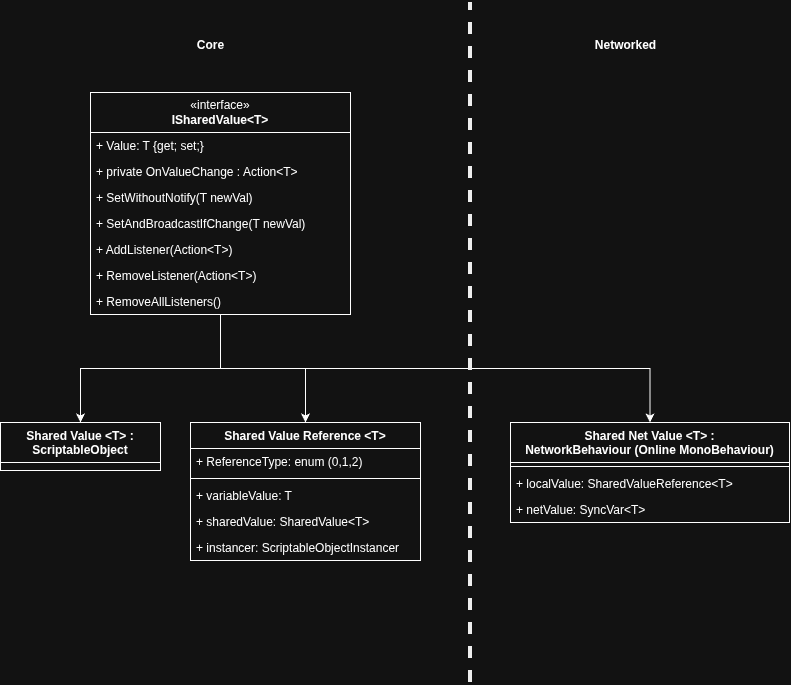
The 2 below are modules that use a slightly different structure, but use SharedValueReference, and follow the same design principles .
- Upgradable - Stores equations, and get different outputs depending on the inputs
- Average - Averages integers, floats, and vectors
Example
Non-SharedValues:
public class PlayerController : MonoBehavior
{
	RigidBody2D rb;
	PlayerInput input;
	[SerializeField] float speed;
	void Update()
	{
		Vector2 moveInput = input.GetValue<Vector2>("Move");
		rb.velocity = moveInput * speed
	}
}PlayerControllerrequiresPlayerInput, and aRigidBody2Dand will break if it doesn’t have either.- It could be reasonable to assume the player would require
PlayerInput, and aRigidBody2D, but if you wanted to test something (like an AI Controller) or add feedback (Velocity Arrow) you would have to rewrite code and add even more coupling to account for it.
SharedValues:
public class PlayerController : MonoBehavior
{
	[SerializeField] SharedVector2Reference moveInput;
	[SerializeField] SharedVector2Reference velocity;
	[SerializeField] float speed;
	void Update()
	{
		//broadcast changes in velocity
		velocity.SetValueWithBroadcastIfChange(moveInput.Value * speed)
	}
}PlayerControllerdoesn’t require any additional components, so you can test different inputs and outputs easier. Ex: AI Controller, Cutscene controller, etc- Uses more components, but each component does 1 thing
- (you would need a
VelocityControllerfor the example above)
- (you would need a
- You can change the origin of any value, add middlemen, and add additional listeners at any point.
Pros And Cons
Downsides:
- The component oriented design can get harder to debug the larger the project grows.
- This is one of the issues I have been addressing as I have been using the tool in more projects. Adding more debug logs, inspector debug values, and more.
- Requires good file organization for the ScriptableObjects to stay under control
SharedValueReferenceis less performant thanSerializeFieldorGetComponent- any time you access them they use a switch statement
- The usage of
UnityEventsrequires public functions decreasing encapsulation.
Upsides:
- Especially good for rapid prototyping
- Decoupled code makes it resistant to system changes
- Modularity leads to emergent behaviors and interactions